Run on your own hosts

Turn a Linux box into your own coding agent.

Bring your own Linux box and CrazyToad makes it a safe, autonomous, cost-bounded coding agent: it reads, writes, runs commands, and runs full claude -p / codex exec loops on the host — confined to a workspace, dropped to an unprivileged user, behind a deny-list and an approval ladder. Drive many boxes at once from your local brain, alongside a Swarm (Lilly Pod) when the work is big.

At a glance

  • A remote agent is a hardened, stdlib-Python program CrazyToad installs on a Linux box you own.
  • Your local brain drives it to do real work on the host — read, write, run commands, run agentic loops.
  • It coordinates many boxes at once, each running its own confined LLM agent.
  • Autonomous but not unrestricted — non-root, cwd-locked, deny-listed, cost-capped, zero telemetry.
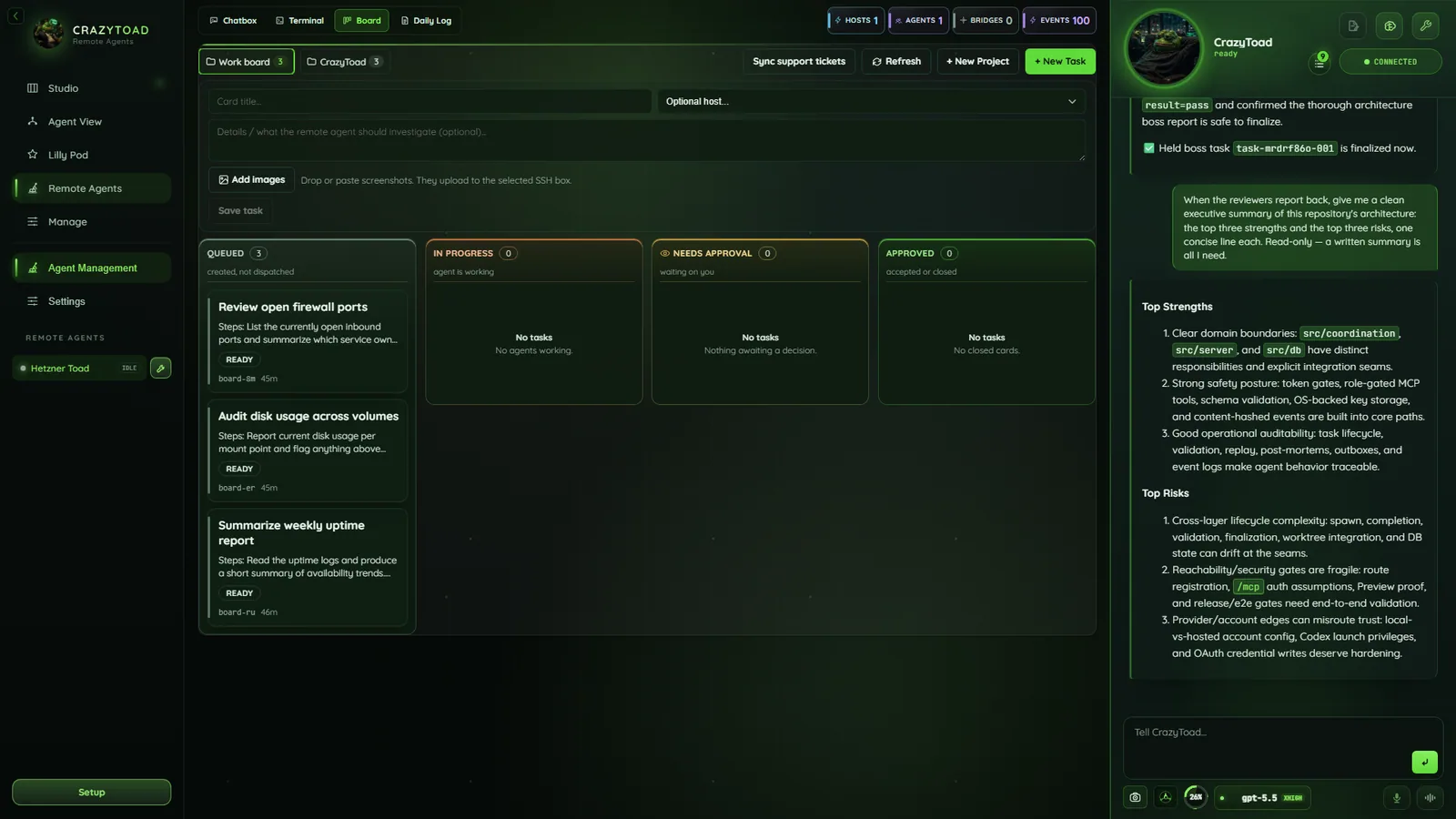
remote agents — chatbox
CrazyToad Remote Agents chatbox and overview

Chatbox, overview, live stream, daily log, and agent rail
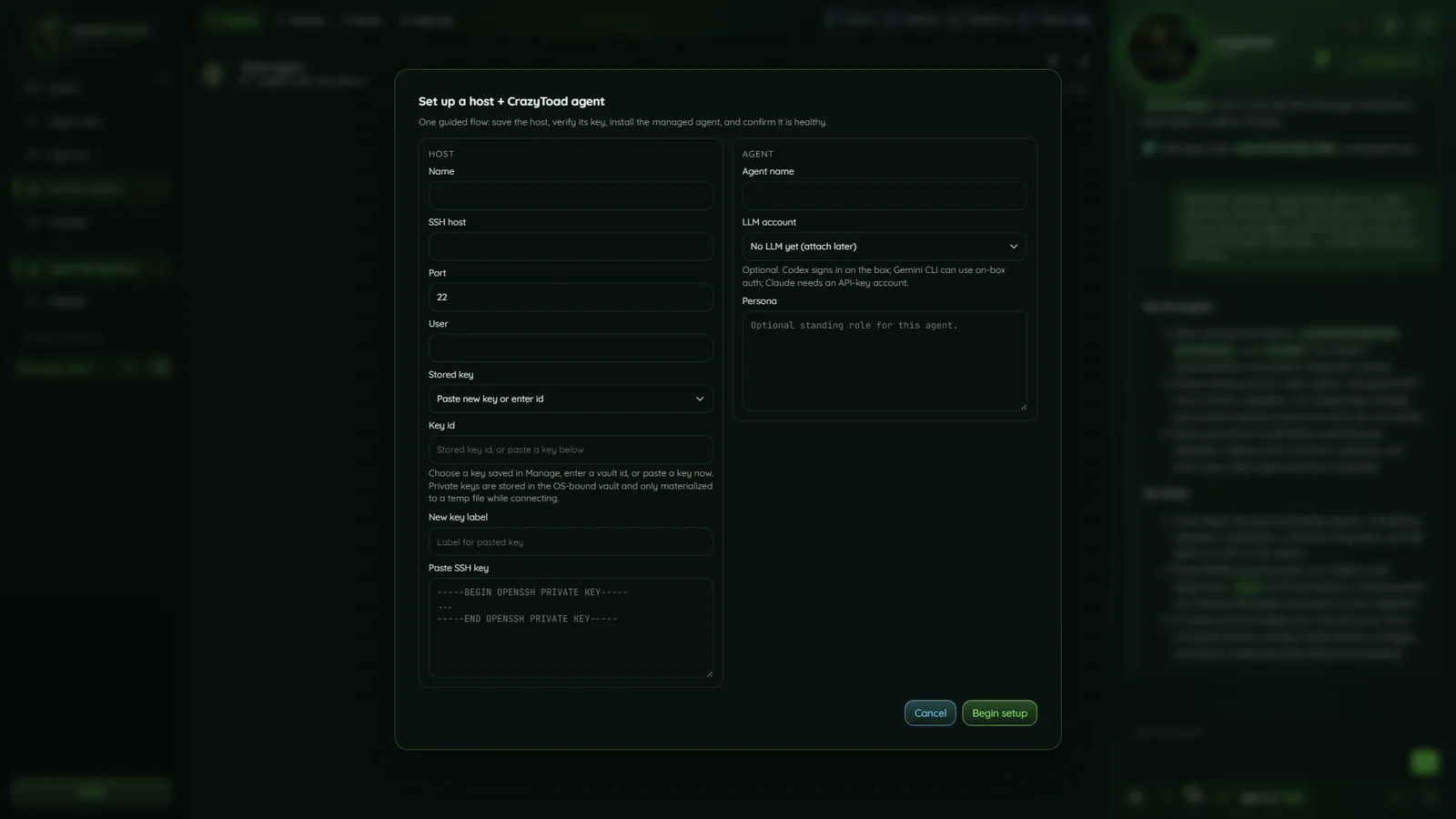
remote agents — setup
CrazyToad Remote Agents setup without sensitive host details

Host setup with sensitive details redacted

What the agent can do on your box

The agent’s verbs fall into three classes — read-only, write/command, and orchestration — each with its own safety rung. The headline is the orchestration verb: claude -p and codex exec run as full agentic loops directly on the host.

Read-only verbsRead files, list dirs, git status, run tests — available even in observe/suggest.
Write & command verbsWrite files, apply patches, run commands — require an approve or auto-limited rung.
Orchestration verbFull claude -p / codex exec loops, run confined as the non-root work user.
Almost any brainDrive it with almost any model your accounts support — not the Gemini/Antigravity CLI.
Note
Autonomous, not unrestricted. The agent runs full coding loops on your box, but it is fenced inside a per-agent workspace as an unprivileged user with a protected-path deny-list always on. It is powerful because it is safely sandboxed — never a way to do anything, anywhere. GitHub work goes through the gh CLI.

Confined by the OS, then again in software

The load-bearing wall is the operating system: a dedicated unprivileged user, crazytoad-work, owns the workspace, and every write, command, and LLM loop drops to it — software guards layer defense-in-depth on top.

Confined non-rootDedicated unprivileged crazytoad-work user owns the workspace.
Cwd-locked workspacePer-agent workspace; .., outside-absolute, and symlink escapes blocked.
Deny-list always on.env / .ssh / keys / credentials / /etc refused at every rung.
Privilege-drop fail-closedNo work user, no write — it never silently falls back to root.
Daily cost capOver-budget LLM work is refused before dispatch; the brain is notified once a day.
Zero telemetrySecrets ride SSH stdin only — never disk on the box, argv, or any timeline.
Note
Subscription-first means $0 steady state. Codex runs on your ChatGPT subscription by default when you drive locally; API keys are a fallback. Combined with the daily spend cap, autonomous box work doesn’t quietly run up a bill.

Three ways to install — on unlimited hosts

Every path runs the same idempotent provisioner: Node, the unprivileged work user, the workspace, a hardened systemd unit, and a locked-down box (UFW SSH-only, fail2ban, key-only SSH). The three routes:

  1. From the app over SSH — Remote Agents → add an SSH host → Install / Connect. CrazyToad deploys the agent, config, and systemd unit over SSH for you. Field-by-field setup is below.
  2. One-line, on the box — run the host-side bootstrap as root on the target Linux box:
    curl -fsSL https://github.com/crazylegs-dom/crazytoad-releases/releases/latest/download/install.sh | sudo bash
  3. Windows wrapper — from Windows, drive the install over SSH:
    ./install.ps1 -HostName <ip> -User root -KeyPath <key>
Note
Unlimited hosts of your own. Run remote agents on as many Linux boxes as you control. The provisioner is idempotent, so re-running it on a host is safe.

Add an SSH host

Click Add SSH host to open the “Add remote host” dialog. Auth is SSH private key only — no password field. On Save, CrazyToad verifies and pins the host key before any install is allowed. Saved keys live in the vault you manage in Manage.

NameRequired. A friendly label that becomes the host id.
SSH hostRequired. The hostname or IP of the machine.
PortSSH port number. Defaults to 22.
UserRequired. The SSH user CrazyToad connects as.
Stored keyPick a key saved in Manage, or “Paste new key…” to add one.
Key idAn existing vault key id, or leave blank to paste a key below.
New key labelName for the key you’re pasting, so it’s saved to the vault.
Paste SSH keyThe private key body, starting -----BEGIN OPENSSH PRIVATE KEY-----.
Warning
Installs are gated on the host key. CrazyToad refuses to install any agent until the host key is verified and pinned. Private keys are stored in the OS-bound vault and only materialized to a temp file while connecting.

Install the CrazyToad Agent

Open the “Install CrazyToad Agent” dialog and choose a managed install (CrazyToad provisions the agent) or a generic log tail (read logs only). The managed agent streams health, answers Chatbox messages, exposes MCP listings, and self-tests before it connects. The driving account comes from Accounts.

NameRequired. The display name for this remote agent.
HostThe host to install on. Shows “Name (N/2 agent slots)”; max 2 agents per host.
Agent type“CrazyToad Agent (managed install)” or “Generic log tail (no agent install)”.
LLM accountA connected account that drives the agent. Subscription accounts are disabled here.
Bridge commandRequired, absolute path. Default /usr/local/bin/crazytoad-agent stream.
Message commandOptional. Default /usr/local/bin/crazytoad-agent chat -q {{message}}.
PersonaThe agent’s system prompt — how it should behave.
Warning
Two limits to remember. A subscription account can’t drive a remote agent — it ships disabled in the LLM account picker, so use an API or local account. And each host holds a maximum of 2 agents. Keep the {{message}} placeholder in the Message command — that’s where your Chatbox text is inserted.

Set the run envelope

The run envelope is a four-rung safety ladder from least to most autonomy — start low, raise it as you trust the agent, and list Protected paths it must always pause on.

observeWatches only — never changes anything.
suggestPlans and proposes — you run the changes.
approveActs, but pauses for your OK on risky work.
auto-limitedRuns routine work alone — stops at protected paths.
Protected pathsGlob patterns the agent must pause on, e.g. /etc/**, **/.env.
Note
Protected paths apply at every rung. Even on auto-limited, the agent stops when it touches a protected path. Use globs like /etc/** and **/.env to fence off config and secrets.

Install from a checkout (advanced)

You can also provision straight from a CrazyToad checkout — copy the agent and run the same hardened script by hand, replacing HOST and root with your own host and user.

  1. Copy the agent to the hostscp deploy/remote-agent/agent.py root@HOST:/tmp/crazytoad-agent.py
  2. Run the provisioning scriptssh root@HOST 'bash -s' < deploy/remote-agent/provision.sh
  3. Register the host — back in CrazyToad, add the host in the dialog (Add an SSH host) so CrazyToad can attach to the service you just provisioned.
Note
The bridge is a wire protocol. The agent speaks crazytoad.remote-agent.v1 — newline-delimited JSON with a 15s heartbeat. Once attached, the Brain management panel catalogs the agent’s brain connections (MCP, API, Docs, Other) and shows each as live, planned, or error.